CARROT Weather
- 2.4
- Rating
- 500.00K
- Installs
- Free
- Price

 Analysis by App-foxy
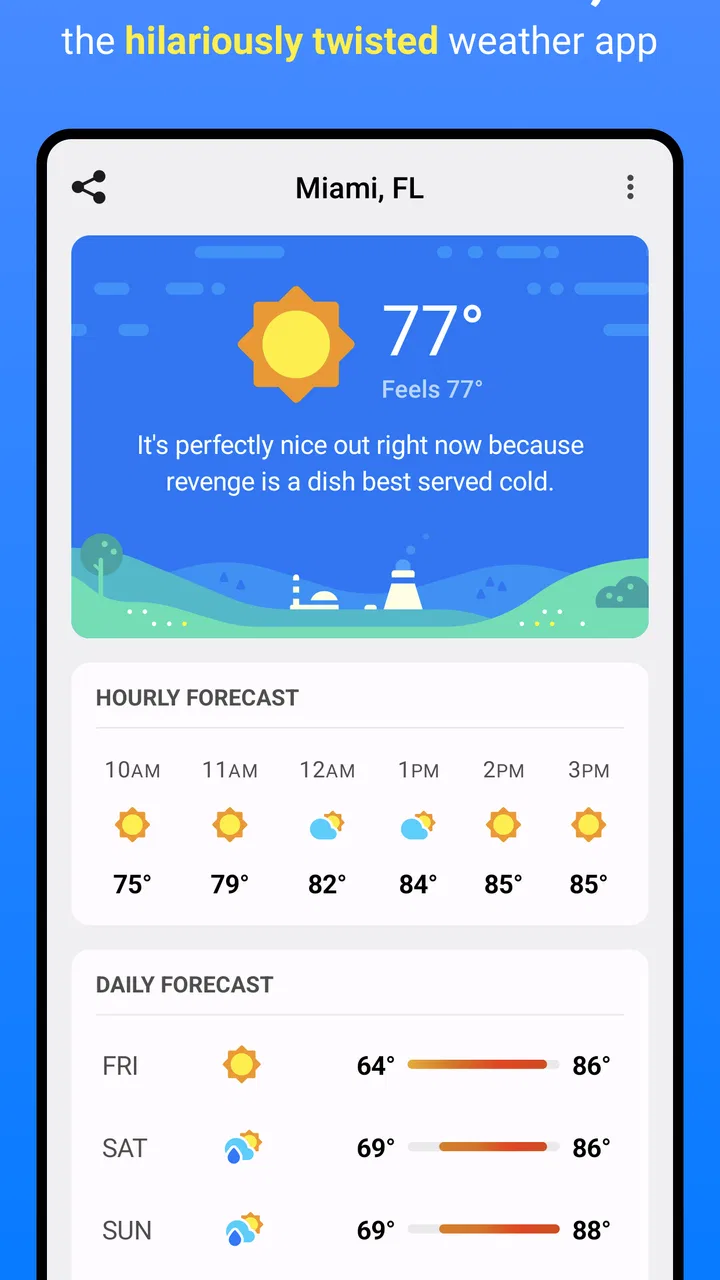
I installed CARROT Weather because checking the forecast often takes longer than it should. I do not need a weather app to fill my screen with information; I need to know whether I should carry an umbrella, leave earlier, postpone a walk, or wear another layer. This app approaches that everyday problem with a sarcastic personality and forecasts presented by an artificial intelligence character. That tone makes a routine check more memorable, although it also means the experience will not suit everyone.
At its core, this is a free weather app from Grailr LLC for people who want forecast information delivered with humor instead of a completely neutral presentation. It is rated for Everyone, works on devices running Android 8.0 or later, and the version I reviewed is 2.5.2. The app has passed half a million installs, so it is not an obscure experiment, but its average rating of 2.4 from roughly three thousand ratings suggests that the personality and overall experience divide users more than a conventional forecast tool might.
Why the unusual presentation matters in everyday use
The recurring problem CARROT Weather tries to remove is not simply “I need weather information.” It is the small annoyance of opening an app, scanning several panels, interpreting symbols, and still wondering what the forecast means for the next few hours. A forecast can be technically detailed while remaining inconvenient in practice. I found the app most useful when I wanted a quick answer with a little character attached to it.
You May Also Like

 Blood Strike: 2.5 Anniversary
Blood Strike’s Loadouts Turn Every Drop Into a Tactical Gamble
A close look at Blood Strike’s custom loadouts: how fast access to signature weapons reshapes its battle royale rhythm, rewards preparation, and narrows the gap between fights.

 Pandora - Music & Podcasts
Pandora’s Music Is Easy to Start, but Harder to Recover
Pandora’s strength is its low-effort path from a seed to a station. Its weak spot is how much confidence it asks you to place in connection, setup, and quiet recovery.

 8 Ball Pool
 Is Built on Rivalries, Rematches, and Routine
A close look at the rivalries, rematches, shared routines, and unanswered safety questions that turn a quick pool match into a persistent mobile community.

 Samsung Music
’s Quiet Strength Is Playing What You Already Own
Its reach comes less from spectacle than from dependable access to a personal library. That simplicity is both the app’s strongest retention engine and its ceiling.

 AccuWeather: Weather Radar
AccuWeather Review: A Quick, Clear Forecast for Everyday Decisions
For everyday plans, the best forecast is the one you can understand quickly. AccuWeather makes rain timing, radar, and local conditions easy to act on, with a few trade-offs.

 Hill Climb Racing
Why Hill Climb Racing Still Turns Crashes Into One More Run
A tiny car, a bumpy hill and one more upgrade: Hill Climb Racing keeps resurfacing because its simple chaos makes every near-miss feel personal.
More From Our News Desk



The humor gives the forecast a stronger identity than the standard rows of temperatures and cloud icons found in many alternatives. I was more likely to remember a warning delivered in a distinctive voice than a bland sentence buried among routine readings. That does not make the underlying weather more accurate, of course, and it should not replace sensible judgment during severe conditions. Its value is mainly in making ordinary checks quicker to notice and less dull.
That distinction is important. If you want a quiet, purely functional screen that behaves like a digital thermometer with forecast panels, this may feel unnecessarily theatrical. If you enjoy a dry or mischievous tone and want the forecast to feel less mechanical, the presentation can make the habit of checking weather easier to maintain. The personality is not decoration only; it is the main reason to choose this app over a plain alternative.
The first setup should be treated as a test, not a commitment
My advice is to install it when you have a few minutes rather than during a rushed morning. Start by checking how clearly the current conditions, near-term forecast, and broader outlook are presented on your device. The most useful setup is the one that lets you answer your normal questions quickly: what is happening now, what will change soon, and whether the weather affects the next trip outside.
I would also spend time deciding whether the snarky voice helps or distracts you. Some people will enjoy opening the app just to see the latest line; others will find repeated jokes tiring after the novelty fades. That is not a minor preference here, because the character is woven into the experience rather than added as an occasional extra. Before considering paid options, use the free version long enough to see whether the tone genuinely saves attention or merely adds another layer to read.
The app is free to download, while in-app purchases range from $1.99 to $19.99 per item. I would not pay immediately. First, compare the free experience with the way you currently check forecasts, then decide whether the additional value fits your routine. The right question is not whether the app is entertaining; it is whether it reduces the time and effort you spend making small weather decisions.
Because the app is suitable for Everyone, it can work as a family-friendly weather tool, but the humor may still be more appealing to adults and older children than to someone who wants a strictly serious interface. The age rating describes suitability, not personal taste. A parent looking for a straightforward forecast for a young child may prefer a calmer presentation, while a family that enjoys playful technology may find the character makes weather checks more engaging.
How I would organize a practical weather-checking routine
I found it helpful to use the app at three different moments instead of repeatedly opening it without a purpose. The first check is in the morning, when I want to decide what to wear and whether travel plans need adjustment. The second is before leaving for a longer trip, when a change later in the day matters more than the current temperature. The third is when plans involve time outdoors, because a forecast that looks harmless at breakfast may be less comfortable several hours later.
This routine exposes one of the app’s strengths: it turns a forecast into a decision prompt. Rather than staring at every available detail, I can ask what action the information should change. That approach saves more time than simply choosing an app with more panels. It also prevents a common mistake with weather tools: checking the current condition and assuming it represents the entire day.
A useful habit is to read the forecast before opening a calendar or navigation app for an outdoor appointment. If rain, cold, or heat could affect the journey, weather should be part of the decision from the beginning. CARROT Weather works well in that role because its unusual wording catches my attention, but I still treat the actual forecast details as the part that matters and the jokes as a memorable wrapper.
Real situations where the app earns its place
Imagine leaving for work on a morning that looks clear through the window. A quick check may reveal that conditions later will be very different, giving you a reason to carry an umbrella or change footwear before stepping outside. In this situation, the app’s benefit is not that it knows your wardrobe; it is that the presentation encourages a complete check instead of a glance at the current sky.
It is also useful before a walk, school run, dog outing, or short bike ride. These activities are easy to start without planning, but uncomfortable weather can turn them into avoidable chores. I would use the app to compare the immediate conditions with the period when I expect to be outside. The humorous delivery makes the check feel lighter, while the practical decision remains simple: go now, take protection, or wait.
For travel, I would use it as a preparation tool rather than a sole authority. Check the forecast before leaving, then check again if the trip is long or the weather is changing. A weather app cannot remove uncertainty, and a playful tone should not encourage overconfidence. For important outdoor work, driving decisions, or dangerous conditions, I would cross-check with a more formal source and pay attention to official warnings.
Another less obvious use is reducing unnecessary checking. When an app makes information easy to understand, it can help establish a fixed routine instead of opening several weather services throughout the day. I prefer one purposeful check before an activity to repeatedly refreshing a forecast without changing my plans. That is where the app can save mental effort, even if each individual forecast screen takes only a moment to read.
Where it feels faster than ordinary weather apps
Many standard weather apps are built around visual density. They show temperatures, icons, hourly rows, daily cards, and additional measurements in one place. That can be valuable for users who want to study conditions, but it can also create friction when the only question is whether to bring a jacket. CARROT Weather’s strongest advantage is the way it gives the forecast a clear voice, making the first useful message easier to notice.
The difference is especially clear for casual users. Someone who rarely studies weather patterns may not want to learn a complicated interface or interpret several graphs. A conversational presentation lowers the barrier to opening the app. I can understand why a person who normally ignores forecast tools might keep this one because it feels more approachable than a wall of numbers.
It is not automatically faster for expert users. If you compare multiple locations, examine detailed trends, or need a highly restrained interface, a conventional weather service may be more efficient. The humor can add reading time, and the character may compete with the information you are trying to find. The app removes one kind of friction—boring, forgettable presentation—but may introduce another for users who want directness above all else.
I also would not confuse a memorable forecast with a more reliable one. The app’s style affects how I consume information, not whether the atmosphere behaves as predicted. If accuracy is the only thing you care about, compare its results with the weather source or service you already trust before making it your sole daily tool. Its most defensible advantage is usability and attention, not a promise that it can eliminate forecast uncertainty.
Small workflow choices that improve the experience
First, use the app for decisions rather than entertainment. The character is easy to enjoy, but the experience becomes more valuable when every check answers a practical question. “Do I need another layer?” and “Should I move this outdoor task?” are better prompts than opening the app simply to browse.
Second, check future conditions before committing to an activity, not only after the weather has already become unpleasant. This sounds obvious, but it changes the app from a reactive tool into a planning aid. The unusual commentary can act as a reminder to look beyond the current moment, especially when the sky outside seems misleadingly calm.
Third, separate the app’s personality from your confidence level. If the wording makes a forecast feel certain or dramatic, pause and look at the actual conditions before acting. Humor is useful for attention, but serious decisions still deserve a calm reading of the forecast and, when appropriate, confirmation from another source.
Fourth, give the free version a fair trial across different routines before considering an in-app purchase. A feature that sounds attractive may not save time if it adds more screens or information than you need. Since the available purchases span from a small one-off amount to a considerably higher item price, I would judge them by repeated practical benefit rather than by curiosity about extra content.
Limitations that affect who should choose it
The biggest limitation is the same feature that makes the app distinctive. Snark is subjective. I enjoyed the sense that the forecast had a point of view, but I can easily imagine someone wanting weather information without jokes, attitude, or an artificial character. If you check the forecast during stressful travel, work, or safety-related situations, a neutral app may feel more appropriate.
The rating of 2.4 across about three thousand ratings is worth considering before downloading. It does not tell me exactly why every user was dissatisfied, but it does show that the overall experience has not worked equally well for everyone. I would interpret that as a reason to test the interface and tone personally rather than assuming the app’s popularity guarantees a good fit.
The free entry point is helpful, but the purchase structure means some users may eventually face decisions about paid content. That is not automatically a problem, though it does make the app less straightforward than a completely free utility. If your goal is simply to see a basic forecast with no interest in customization or extras, a standard weather app may offer a cleaner path.
Device compatibility is another practical consideration. The app requires Android 8.0 or later, so it is not suitable for every older Android phone. For supported devices, the current version is 2.5.2, but the more important question is whether the app feels comfortable on your particular screen and operating system. A forecast that is charming on one phone can feel crowded or less convenient on another, so I would judge the actual reading experience rather than relying on screenshots or reputation.
My verdict for different kinds of users
I recommend CARROT Weather to people who repeatedly forget to check the forecast, dislike sterile weather interfaces, or enjoy a sarcastic voice in everyday apps. It is especially appealing if you want a quick prompt before commuting, walking, running errands, or planning time outdoors. The app makes routine information more noticeable, and that can translate into fewer last-minute decisions and less pointless forecast refreshing.
I would steer you elsewhere if you want a completely serious presentation, depend on highly detailed weather analysis, or prefer not to encounter in-app purchase options in a utility. A traditional weather service is likely better for comparing extensive forecast details or keeping the interface as quiet as possible. For severe weather and important travel, I would also use official alerts or another trusted source alongside it rather than treating a witty forecast as the final word.
After using it, my view is that the app succeeds when judged by attention and convenience rather than by the amount of information it can display. It does not make weather predictable, but it can make checking the forecast feel like a small, repeatable habit instead of a chore. If a memorable tone helps you make faster everyday decisions, the free version is worth trying before you consider any purchase. Just be honest about what you need: this is a character-driven weather companion, not the best universal choice for every forecast user.
For me, that balance is the reason it remains interesting despite the mixed rating. The app removes the boredom that causes people to skip routine checks, but it replaces that boredom with a style that some users will find distracting. Try it on ordinary days, test it before an outdoor plan, and notice whether you actually spend less time deciding what to do. If the answer is yes, Grailr LLC has solved the right problem for you; if not, a simpler weather app will probably be the better tool.
FAQs for CARROT Weather
01What is CARROT Weather, and what makes it different from other weather apps?
CARROT Weather is a weather app that combines forecasts with a distinctive sarcastic personality, humorous commentary, and customizable visual styles. In addition to current conditions, it can provide hourly and daily forecasts, severe weather alerts, radar information, widgets, and location-based updates. Its main appeal is the entertaining presentation, although users who prefer a completely neutral or minimalist weather experience may find the humor less suitable.
02Is CARROT Weather free to download and use?
CARROT Weather can generally be downloaded for free, but some of its more advanced features may require a subscription or in-app purchase. Depending on the platform and plan, premium options can include expanded forecast details, additional weather sources, radar tools, widgets, notifications, customization, and extended forecast information. Before subscribing, users should review the current pricing and trial terms shown in the App Store or Google Play.
03How accurate are CARROT Weather forecasts?
Forecast accuracy in CARROT Weather depends on the weather data provider, your location, and the type of forecast being viewed. The app presents useful current conditions and short-term predictions, but no weather service is perfectly accurate, especially during rapidly changing conditions or severe storms. For important travel, outdoor, or safety decisions, users should compare the information with official local weather warnings and emergency services.
04Does CARROT Weather support widgets, notifications, radar, and severe weather alerts?
CARROT Weather supports several convenient features designed to make weather information easier to check throughout the day. Depending on your device, operating system, subscription level, and region, these may include home-screen or lock-screen widgets, precipitation notifications, severe weather alerts, radar maps, and forecast updates. Some features may need to be enabled manually in both the app and your device’s notification or location settings.
05Does CARROT Weather collect location or personal data?
CARROT Weather may use your location to provide local forecasts, alerts, and weather updates, particularly when automatic location tracking is enabled. The exact information collected and how it is used can vary by platform, settings, and the developer’s current privacy policy. Before installation, users should review the app’s permissions and privacy details, and they can usually choose manual locations or restrict background location access if preferred.
Pros
- Playful forecasts make checking the weather more engaging.
- Useful weather maps help visualize rain
- wind
- and temperature changes.
- Widgets provide quick forecast details without opening the app.
- Customizable notifications can keep you informed about changing conditions.
- Supports multiple locations for tracking weather in different places.
Cons
- Many advanced features require a paid subscription.
- The humorous tone may not appeal to users wanting a serious interface.
- Some detailed weather data depends on available regional coverage.
- Frequent jokes and animations can feel distracting during quick checks.
- Battery use may increase when location-based updates are enabled.

CARROT Weather
Gallery